Kerf, tolerances and minimum holes in laser cutting
Three questions come up constantly when preparing a drawing for laser cutting: do I have to compensate for the beam width (the kerf)? What precision will I get? And how far can I push small holes? This page answers all three, with the real values our application uses for each material and each in-stock thickness.
Good news: you don't have to memorize anything. When you upload your drawing, the Laseo application automatically checks every hole, every bridge and every dimension against the exact limits of the chosen material — and tells you precisely what to fix, if anything.
What is kerf, and do you have to compensate for it?
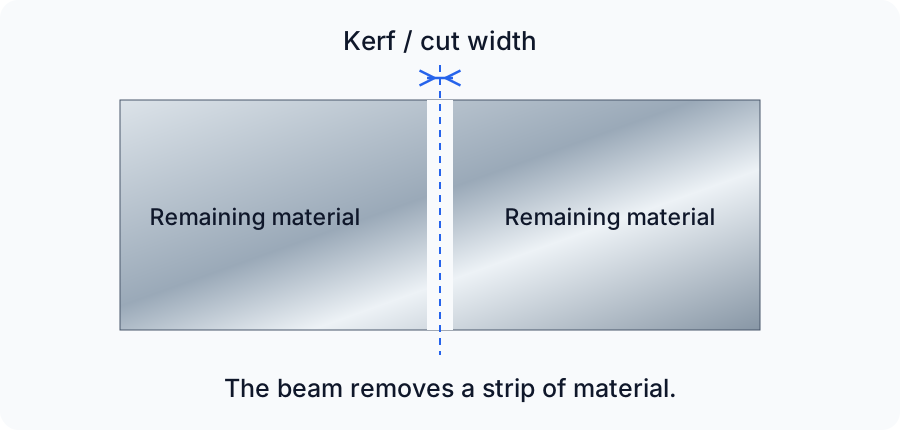
The kerf is the width of material vaporized by the laser beam during cutting — the equivalent of the saw line in woodworking. If we cut exactly on your drawing's line, every outer contour would come out slightly smaller than intended, and every hole slightly larger.
That's why the laser path is offset automatically at manufacturing: the beam runs outside the contours and inside the holes, so the finished part matches the nominal dimensions in your file. Compensation varies by material and thickness, and it's applied by our equipment — never by you.
Don't oversize your holes or shrink your contours "to compensate for the laser." Draw the final dimensions you want to get: a 0.250″ hole in your file gives a 0.250″ hole in the part. A manual compensation would be applied twice and throw your part off.
What precision do you get in laser cutting?
| Operation | Tolerance | Process |
|---|---|---|
| Metal cutting (up to 1/4″) | ±0.005″ (±0.13 mm) | Fiber laser |
| Heavy steel plate — 5/16″ and 3/8″ | ±0.008″ (±0.20 mm) | Fiber laser |
| Heavy steel plate — 1/2″ | ±0.012″ (±0.30 mm) | Fiber laser |
| Acrylic cutting | ±0.009″ (±0.23 mm) | CO2 laser |
| Bending | ±0.015″ per bend, cumulative | CNC press brake |
The ±0.005″ tolerance covers metals up to 1/4″ thick — the vast majority of parts. On heavy steel plate it widens a little: ±0.008″ in 5/16″ and 3/8″, then ±0.012″ in 1/2″, because material that thick widens the beam's cut. In every case, it's amply enough for the great majority of mechanical assemblies: bolt holes, notches, tabs, mounting brackets.
If your part is bent, keep in mind that bending tolerances add up from one bend to the next. The complete rules (radii, minimum flanges, hole-to-bend distances) are in our bending guide.
Why is a hole that's too small rejected?
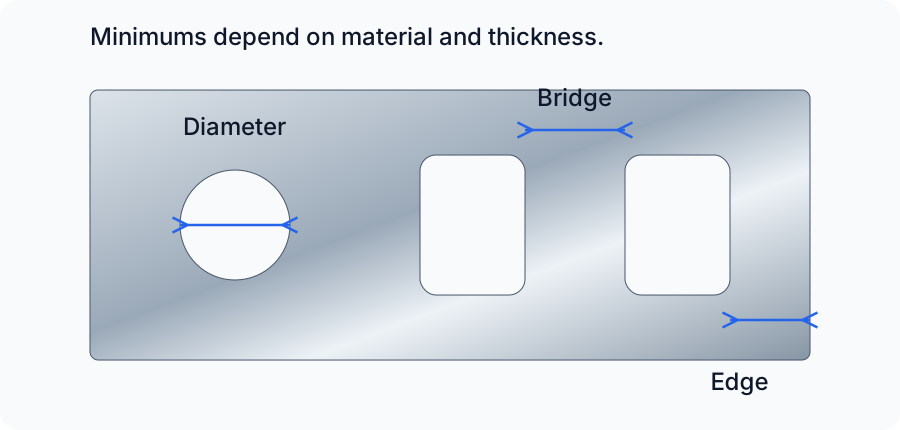
The thicker the sheet, the more energy the beam must inject to get through it — and the wider the heated zone spreads. In a hole whose diameter is too small relative to the thickness, the heat has nowhere to escape: the molten metal doesn't eject cleanly, and the hole comes out conical, full of dross, or outright welded shut. That's why the minimum hole diameter increases with thickness.
Two other rules of the same kind: the minimum bridge (the narrowest strip of material between two cuts, which would melt or warp if it were any thinner) and the minimum distance between a hole and the edge of the part (below this distance, the remaining wall deforms during cutting). Here are the values for a few common thicknesses:
Mild steel
| Thickness | Min. hole | Min. bridge | Min. hole ↔ edge |
|---|---|---|---|
| 22G (0.0299″) | 0.025″ | 0.015″ | 0.020″ |
| 16G (0.0598″) | 0.040″ | 0.030″ | 0.020″ |
| 12G (0.1046″) | 0.070″ | 0.035″ | 0.031″ |
| 10G (0.1345″) | 0.080″ | 0.055″ | 0.041″ |
| 1/4″ (0.250″) | 0.187″ | 0.125″ | 0.075″ |
| 1/2″ (0.500″) | 0.375″ | 0.190″ | 0.150″ |
304 stainless steel
| Thickness | Min. hole | Min. bridge | Min. hole ↔ edge |
|---|---|---|---|
| 22G (0.0312″) | 0.025″ | 0.015″ | 0.015″ |
| 16G (0.0625″) | 0.040″ | 0.024″ | 0.020″ |
| 12G (0.1094″) | 0.070″ | 0.040″ | 0.030″ |
| 1/4″ (0.250″) | 0.187″ | 0.080″ | 0.060″ |
5052-H32 aluminum
| Thickness | Min. hole | Min. bridge | Min. hole ↔ edge |
|---|---|---|---|
| 22G (0.025″) | 0.025″ | 0.020″ | 0.020″ |
| 18G (0.0403″) | 0.035″ | 0.020″ | 0.020″ |
| 12G (0.0808″) | 0.070″ | 0.030″ | 0.024″ |
| 8G (0.1285″) | 0.080″ | 0.048″ | 0.038″ |
| 1/4″ (0.250″) | 0.187″ | 0.095″ | 0.075″ |
G90 galvanized steel
| Thickness | Min. hole | Min. bridge | Min. hole ↔ edge |
|---|---|---|---|
| 22G (0.034″) | 0.025″ | 0.020″ | 0.020″ |
| 16G (0.064″) | 0.040″ | 0.024″ | 0.020″ |
| 12G (0.108″) | 0.070″ | 0.035″ | 0.031″ |
These tables show representative thicknesses — each material has more of them. No need to check everything by hand: the application applies the exact limit of each thickness at upload. To convert a gauge to millimeters, see our gauge / inch / mm conversion table.
Fiber laser or CO2 laser: what's the difference for your parts?
At Laseo, metals (steel, stainless, aluminum, galvanized, copper, brass) are cut on the fiber laser, to a ±0.005″ tolerance. Plastics and rubbers (acrylic, EPDM, etc.) are cut on the CO2 laser: on acrylic, the tolerance is ±0.009″ and the edge comes out flame-polished, with no additional finishing. The hole rules apply to CO2 as well — a few examples:
| Material (CO2) | Thickness | Min. hole | Min. bridge | Min. hole ↔ edge |
|---|---|---|---|---|
| Acrylic | 3 mm (0.118″) | 0.047″ | 0.053″ | 0.035″ |
| Acrylic | 6 mm (0.236″) | 0.086″ | 0.096″ | 0.064″ |
| Acrylic | 12 mm (0.480″) | 0.250″ | 0.250″ | 0.200″ |
| EPDM rubber | 1/16″ (0.063″) | 0.047″ | 0.053″ | 0.035″ |
| EPDM rubber | 1/8″ (0.125″) | 0.047″ | 0.053″ | 0.035″ |
Note: on a soft material like EPDM, the minimums stay constant from one thickness to the next, whereas on acrylic they climb quickly with thickness — a 1/4″ hole goes through 3 mm without a problem, but not through 12 mm.
What part sizes can be cut?
| Case | Minimum size | Maximum size |
|---|---|---|
| Metals — thin sheet (up to ~1/8″) | 0.250″ × 0.375″ | 30″ × 44″ |
| Mild steel 3/16″ and 1/4″ | 0.500″ × 0.750″ | 30″ × 44″ |
| Mild steel 5/16″ to 1/2″ | 1.000″ × 1.000″ | 30″ × 44″ |
| G90 galvanized steel | 0.250″ × 0.375″ | 35″ × 47″ |
| Acrylic (CO2) | 0.187″ × 0.375″ (depending on thickness) | 35″ × 47″ |
| EPDM rubber (CO2) | 0.187″ × 0.375″ | 44″ × 30″ |
Below the minimum size, the part risks falling between the slats of the cutting table or being blown away by the gas jet. Above the maximum size, it exceeds the work area. The exact limits of each material and thickness are shown on its data sheet — and if your part will be bent, different limits apply (see the bending guide).
The essentials in four points
- Kerf: compensated at manufacturing — draw your final dimensions, with no adjustment.
- Cutting tolerance: ±0.005″ on metals (±0.008″ to ±0.012″ for heavy steel plate), ±0.009″ on acrylic.
- Holes, bridges and edge distances: the minimums increase with thickness — see the tables above.
- Automatic validation: the application checks all these rules at upload, for each material and thickness.
To go further: the gauge / inch / mm conversion table to pick the right thickness, and the bending guide if your part has bends. A question about a special case? Write to us at info@laseo.ca.
Your part, your choices, your price.
Configure one part or a series. See your price and lead time before ordering.
No account needed for pricing · Free shipping from $49